Troubleshooting common issues you may face while playing Game Changer 5
Playing Game Changer 5 is full of fun and excitement. But sometimes you may encounter unexpected issues while downloading or playing the game that you'll want to fix quickly. This guide covers the most common issues you may encounter with quick fixes.
Common issues you might face
Here are the most common issues and how to fix them:
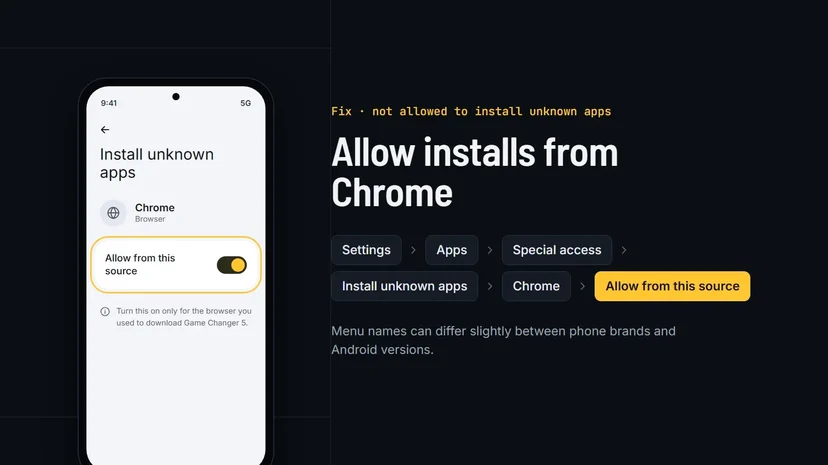
Your phone is not allowed to install unknown apps
This happens when you have not enabled downloading and installation from Unknown Sources. Navigate to Settings → Apps → Special access → Install unknown apps. Select Chrome and turn on Allow from this source.
App not installed
This may happen due to an older version already installed on your phone, or low storage. You need to install the game’s latest version and free up some space to fix it.
There was a problem parsing the package
This is a common installation issue and usually occurs when the file is not downloaded correctly. Delete the old file, download it again, and install it to fix it.
Not enough storage
Delete the apps and media you don’t need anymore to free up space on your phone. You can also play the game at Low settings to manage the storage.
Play Protect warning
You may see the Play Protect warning while installing apps from Chrome. Just tap More details and then Install anyway to install the game.
Game crashes on start
You should close the background apps and restart your device to start the game normally. Playing on Low or Medium settings can also help prevent future crashes.
Game lags a lot
Make sure that your device has enough free space to run the game. Also, set the quality to Low for lag-free gameplay.
Conclusion
Every player wants smooth, issue-free gameplay. So, we have listed all the possible issues you may encounter while installing or playing Game Changer 5, along with quick fixes so that your gaming experience remains uninterrupted. Most of these issues take just a few minutes to fix.